
Taxi Dispatch Software

One live board for every job, from pool to completed

Almighty Dispatch’s dispatch board is where a job actually lives — booked, assigned, tracked and closed out in one real-time view, not re-typed between a booking system, a driver group chat and a spreadsheet.
· 7-day free trial· No long-term contract· Setup help on every plan
Dispatchyourcompany.co.ukLive
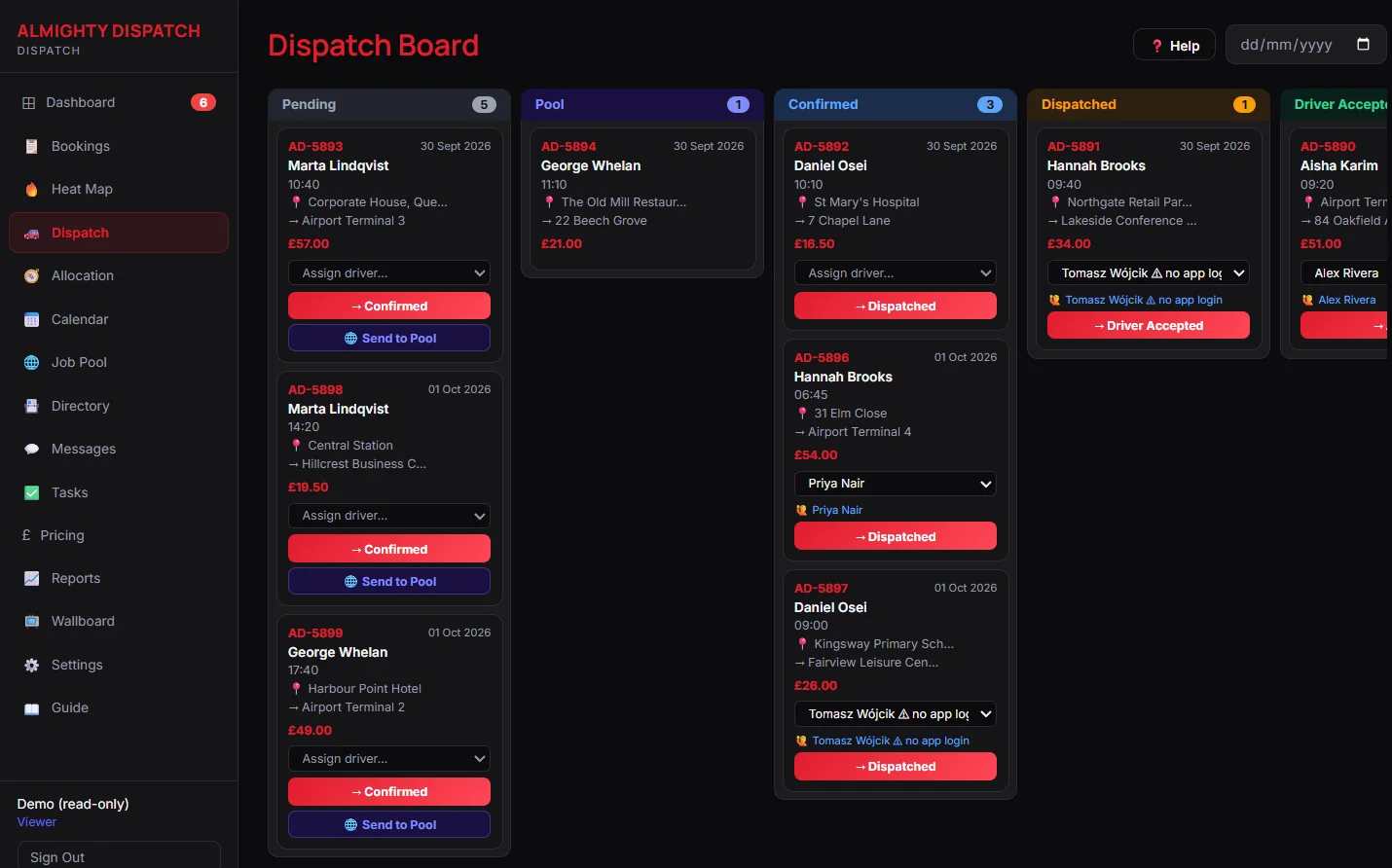
Live dispatch board with Pending, Pool, Confirmed and Dispatched columns

What this gives your office

01
One queue for the whole job, start to finish
Every booking moves through the same board — Pending → Pool → Confirmed → Dispatched → Accepted → In Progress → Completed — so nobody is checking a second screen to see where a job actually is. Click a job’s time, payment type, fare or driver straight from the list to fix it without opening the full form.
02
Know who is actually free before you assign
The live driver map shows GPS position and online/offline state, and the assign-driver list suggests the nearest genuinely available driver by real driving distance — a suggestion you can still override, never an auto-assign. The 24-hour allocation timeline shows every driver’s day as a Gantt view at a glance.
03
The whole office looking at the same picture
Wallboard mode turns any office TV or spare monitor into a live, sidebar-free display of today’s counts and driver status. Late-pickup alerts and live job counters surface a problem before a customer has to call about it, and an inbound call screen-pops the caller matched to their own record.

Every dispatch feature, in one list

The same list as our full Features page — nothing extra promised here, and nothing left out.

✓Real-time dispatch board: Pending → Pool → Confirmed → Dispatched → Accepted → In Progress → Completed
✓Allocation timeline — a 24-hour Gantt view of every driver’s day
✓Job Pool — publish work for any available driver to claim
✓Live driver map with GPS positions and online/offline state
✓Heat map showing where your work actually comes from
✓Nearest-driver suggestions when assigning a job
✓Operational zones with live coverage counts
✓Wallboard mode for an office TV or second monitor
✓Late-pickup alerts and live job counters
✓Inbound call screen-pop matching the caller to their record

Dispatch, explained simply

Does the dispatch board update in real time?

Yes. A status change, a new pool bid or a driver going online reaches every dispatcher’s screen the moment it happens — nobody needs to refresh the page to see current state.

Can more than one dispatcher work the board at once?

Yes. Owner, dispatcher and viewer roles control who can act, and a tenant running more than one office can grant each operator their own page access — a viewer account genuinely cannot write, not merely cannot see the buttons.

Do drivers need a separate app to receive jobs?

They use the Driver App (App Store and Google Play, included on every plan) or the Operator App if they are also managing the office from a phone. Dispatch itself runs in your browser with nothing to install.

More questions on subscribing or your own data — see the full FAQ.

Part of one connected platform

The dispatch board is not a standalone tool — the same booking a driver accepts here shows up live in the Operator and Driver apps, prices from the same engine the booking widget charges from, and closes out straight into invoicing and driver statements.

Want to see your own jobs on this board?

Book a walkthrough tailored to how your office actually dispatches, or start a 7-day free trial.