
Live Driver Tracking
See every driver, live — from the office and the passenger’s phone
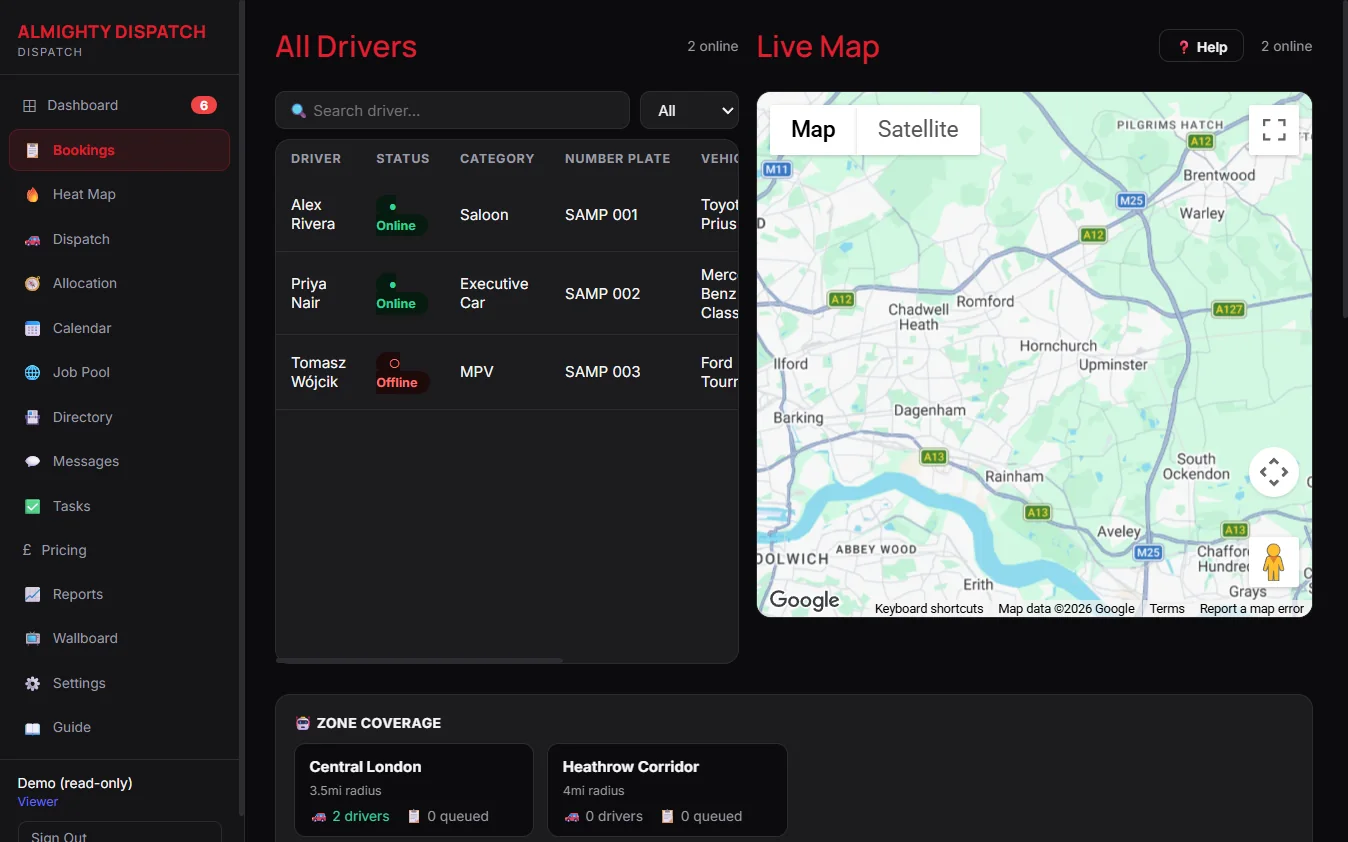
One live position feed powers the office map, the nearest-driver suggestion when assigning a job, and the journey a passenger watches from their own phone — the same picture, not three separate ones.
· 7-day free trial· No long-term contract· Setup help on every plan
What this gives your office
01
One live map, not a guess
Every online driver’s GPS position and availability state shows on one live map — not a last-known-location text message or a phone call to check.
02
The nearest driver, suggested — not guessed
When assigning a job, the driver list is ordered by real driving distance to the pickup, worked out from live positions. It is a suggestion the operator can still override, never an automatic assignment.
03
The passenger sees it too
A passenger tracks their own journey from the Customer App, with driver and vehicle details shown throughout the whole active trip — not just at the moment a job is dispatched, and with no separate tracking link to send them.
What’s included
✓Live driver map with GPS positions and online/offline state
✓Nearest-driver suggestions when assigning a job, by real driving distance
✓Allocation timeline — a 24-hour Gantt view of every driver’s day
✓Passengers track their own journey from the Customer App, with driver and vehicle details shown throughout
✓Add a journey to your own calendar in one tap — driver and passenger both
✓Wallboard mode showing live driver state on an office TV or second monitor
Tracking, explained simply
Does tracking need a driver to do anything extra?
No. Position updates while the Driver App is open and the driver is online — there is nothing separate to switch on.
Can a passenger see the driver before pickup, not just once the job is dispatched?
Yes. Driver and vehicle details stay visible throughout the whole active journey, not only at the moment of dispatch.
Is the nearest-driver suggestion an automatic assignment?
No — it is a suggestion only, ordered by real driving distance. The operator always makes the final choice.
More questions on subscribing or your own data — see the full FAQ.
Explore the connected areas
Taxi Dispatch Software
One live board for every job, from pool to completed.
Explore page →
Zones & Geofencing
Draw the areas you actually cover and see live coverage against them.
Explore page →
Driver Job Offers
Publish work to your available drivers and watch every response land in one place.
Explore page →